
A Topic is a group of options organized together under a unifying concept, which is the title of the topic.
Topics are non-overlapping; an option can only belong to one topic.
Topics are often used to group options into pages for display purposes. For example "Children's Recreation" may be used to group different facilities options for children, in designing a park. Topics can also be used to group options into Topic sliders displayed on a Topic Slider Voting Page. For example, the Topic "Housing Units" may be used to group different amounts of housing units along with their associated Option Attributes, like cost, square feet, number of rooms...etc.
Topics are also used to define relationships between options. For example, there is often a need for a scenario rule allowing only one option from a topic.
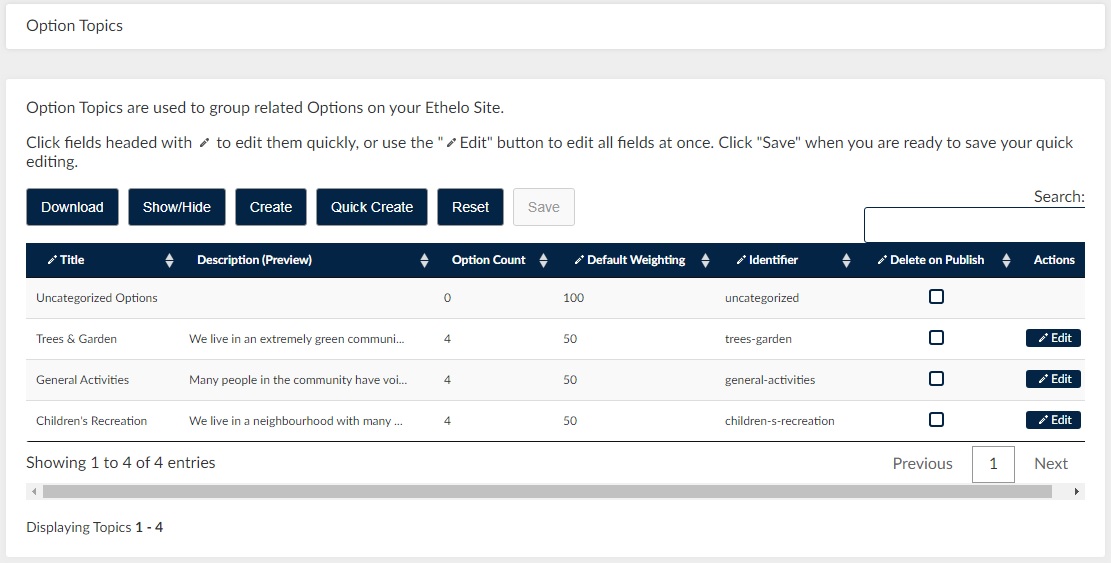
To access Option Topics, go to Voting >Option Topics in the Admin Panel.
Weights
When options are grouped into multiple topics, the topics will carry relative weights. Topic weights can be set centrally by the administrator, or by individual participants using a slider scale. The default Topic Weight is 50.
Topics can appear in various ways, depending on the kind of page and view.
- Topic Page: Criteria appear as the likert voting scale inside each Option Panel.
- Topic Weighting Page: Topics appear as sliders that can be used to divide a pie-chart.
See also: